It is currently 15 Apr 2026, 07:56

Forum » Public Section » Public


Post new topic  Reply to topic  [ 23 posts ]  Go to page 1 2 3 Next
Author Message
 Post subject: What is wrong with my computer?
PostPosted: 17 Dec 2017, 19:05 
Offline
User avatar

Joined: 08 Dec 2007, 12:07
Posts: 8665
Location: Sweden
All of a sudden, when starting an Overwatch game my computer crashed. Before it crashed the screen went haywire with a bunch of purple and pink colours and then ... black.

When i restarted the computer it looked all fucked up. There are white lines and squares blinking all over the screen. I have 3 pictures (that are really crappy and blurry) where you can almost see what i mean.

Image


Image


Image

These things keep moving around and blinking.

When i restarted my computer i got to that "you closed the computer in an incorrect way" thing, and i chose to start windows "as normal"- Bad choice, i got the welcome screen and then everything crashed again.

Second time i picked Errorsafe mode instead of "as normal", or whatever the mode is called (my computer speaks swedish and i dont know the translation). This time i got into windows, but everything is still looking fucked up. I tried downloading the latest graphicsdriver from NVIDIA in case it was something to do with the driver, and then i restrted the computer.

THis time i got into normal windows, but the screen looks glitchy still and i get a black screen every 20 sec or so. I also have an error message down in the corner that keeps coming up (so maybe it keeps happening?) saying "Your graphics driver stopped responding and has been restored" (or similar, in swedish).

Does anyone know what the error is?
And can it be fixed in an hour?

:o

I dont know anything about hardware or graphicscards or whatever this is. If restart doesnt work, i'm lost :'o

_________________
:o


Top
   
 Post subject: Re: What is wrong with my computer?
PostPosted: 17 Dec 2017, 19:09 
Offline
User avatar

Joined: 08 Dec 2007, 12:07
Posts: 8665
Location: Sweden
The laptop i am using now I cant play wow on btw. Just take shitty pictures of my computerscreen.

_________________
:o


Top
   
 Post subject: Re: What is wrong with my computer?
PostPosted: 17 Dec 2017, 19:23 
Offline
User avatar

Joined: 08 Dec 2007, 12:07
Posts: 8665
Location: Sweden
Teldryn just said he thinks my graphicscard is dying.

It's a NVIDIA Gforce 650 from when MoP was launching. So... september 2012?

_________________
:o


Top
   
 Post subject: Re: What is wrong with my computer?
PostPosted: 17 Dec 2017, 19:31 
Offline

Joined: 11 Mar 2017, 17:56
Posts: 39
these are my troubleshoot steps.

1. try uninstall/reinstall of gfx drivers
2. try re seating the cable (unplug/replug)
3. if possible try a different video cable
4. try re-enabling the onboard gfx card and connect via that see if the issue goes away.
last option. open up command prompt and run an sfc /scannow

it is looking like a possible gfx card fault but those would be what i'd do to try and diagnose/remedy the fault


Top
   
 Post subject: Re: What is wrong with my computer?
PostPosted: 17 Dec 2017, 19:35 
Offline
User avatar

Joined: 06 Sep 2017, 22:03
Posts: 52
Location: Edinburgh
I agree with Teldryn.

I've got a spare 660 and a 650 if you wanted either of those (the 650 I cant 100% vouch for but the 660 is practically brand new, big frozr cooler on it to) if you'd like either of those


Top
   
 Post subject: Re: What is wrong with my computer?
PostPosted: 17 Dec 2017, 19:43 
Offline
User avatar

Joined: 17 Jul 2013, 23:31
Posts: 324
Location: Italy
Luria wrote:The laptop i am using now I cant play wow on btw. Just take shitty pictures of my computerscreen.
I love the mental image of Luria holding a laptop in the air to take pictures of her screen with the webcam (?)

I'm doubtful its a driver messup unless you clicked "enlarge my penis" on some streaming website, but i'd still follow Art's instructions.

Download Display Driver Uninstaller, run it in safe mode, uninstall the drivers, download the freshest ones off Nvidia website and give it a go, but the symptoms are consistant with a GPU failure.
If you do have an on board video card, it might be enough to play Wow at stupid low framerates. I think my old HD3000 gave me 30ish fps in Shrine with all the people around... so might be worth a try?

As a last resort/temporary patchup underclocking the GPU to the very minimum in Afterburner could render it stable enough to run Wow, but yeah, it might be too advanced and most likely not helpful.

This is why girls get nerd boyfriends btw.


Top
   
 Post subject: Re: What is wrong with my computer?
PostPosted: 17 Dec 2017, 19:48 
Offline
User avatar

Joined: 08 Dec 2007, 12:07
Posts: 8665
Location: Sweden
Thank you so much Elliel for the offer, but i guess i wont get a card that you send any faster than i will get a new crd that i buy in sweden :O

Arthurios, thank you for the steps. I have done 1 and 2, but i will do 1 again just to make sure.

Kihel, i will reread yours and do whatever you typed about after i do Art's list.

And yes, i did hold the laptop to take pictures with the webcam :o

_________________
:o


Top
   
 Post subject: Re: What is wrong with my computer?
PostPosted: 17 Dec 2017, 19:49 
Offline
User avatar

Joined: 08 Dec 2007, 12:07
Posts: 8665
Location: Sweden
I'm installing TS on this thing so i will be on TS at some point.

_________________
:o


Top
   
 Post subject: Re: What is wrong with my computer?
PostPosted: 18 Dec 2017, 08:53 
Offline
User avatar

Joined: 17 Jul 2013, 23:31
Posts: 324
Location: Italy
You might have already purchased a new computer, however since yesterday there was a cacophony of (over)helping ill just put my thoughts in a more comprehensible way.

First of all, your computer might not be entirely dead. It IS worth giving a try removing the video card, plugging the monitor in the on-board integrated gpu and see if you still get any video artifacts. Brushing it off with "well it already has 5 years anyways!" is silly, we are not in 1995 anymore! The CPU market has stagnated immensely going towards having more cores(wich you dont care about) rather than faster ipc (wich you want). I bought my old pc in march 2011 and it still runs Wow MORE than fine. Future proofing doesnt really exist even if you spend 2k euro and especially now that we are in a bit of a transition state. Will newer games ever use 6+ cores efficiently? Fuckknows.

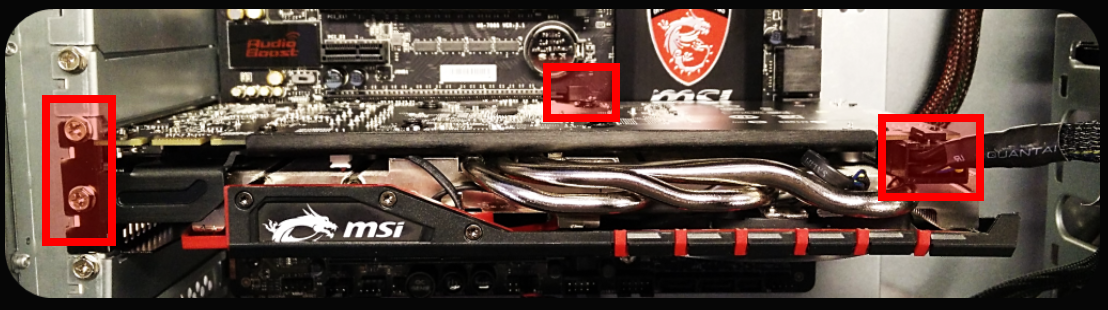
Image

Now, looking at the video card from the top, the screws are on the left as pictured. Remove them, make sure the lever at the bottom/center is flicked to open and remove the card. Boot the pc and if no artifacts dont get scared if everything looks big as the resolution might be reset due to no dedicated graphics drivers. Windows should install them automatically. If it turns out to be a graphics card issue, then i'd suggest buying either a refurbished 970 for a hundred bucks or so, or a 1050/1060 at best. Suggesting anything above a 1070ti wich is already massive overkill is just having no respect for other people's money.

If the motherboard is dead, i'd still not suggest anything more than a Ryzen 1500x(or similarly priced/ranged cpus) + 1060 + 16gb of fast ram and a nice sata3 SSD. Thats the best bang for your buck you can get right now, guaranteed to run Wow at "more than 10fps is fine cit. Luria" for the next decade. Spending far more than this computer as of today does not guarantee you _significant_ improvements, not in the Luria way of usage at least. When she wants to play VR stuff at 240fps, then we can suggest something appropriately powerful.


Top
   
 Post subject: Re: What is wrong with my computer?
PostPosted: 26 Dec 2017, 13:15 
Offline
User avatar

Joined: 08 Dec 2007, 12:07
Posts: 8665
Location: Sweden
I picked up my new computer on the Saturday! Yay!!

BUT... I dont know if it works, because i cant plug my screen into it. Apparently my screen is analog or has an analog cord or whatever, and the new computer needs digital cords. I went to buy a new cord, but the guy at the shop claimed that i cant go from analog to digital without having some switcharoo box-thingy that they apparently didnt have in stock.

So apparently i needed a new screen. And the screen i suggested he claimed was not a gaming screen - and when he showed me the gaming screens it turned out they were either huge (which I dont want) or not in stock (coming on Friday). So... it was superbusy in the shop and I didn't know what to do, so I just paid for a smaller screen that will come on Friday. :(

Result: Luria can't raid on Wednesday and Thursday AND I will soon have a new screen that I will most likely hate for reasons yet unknown.

_________________
:o


Top
   
Display posts from previous:  Sort by  
Post new topic  Reply to topic  [ 23 posts ]  Go to page 1 2 3 Next

Forum » Public Section » Public


Who is online

Users browsing this forum: No registered users and 1 guest


You cannot post new topics in this forum
You cannot reply to topics in this forum
You cannot edit your posts in this forum
You cannot delete your posts in this forum
You cannot post attachments in this forum

Search for:
Jump to:  
Lazy Peon Tavern 2010 | Template created by Happy Apple Designs™
Powered by phpBB © 2000, 2002, 2005, 2007 phpBB Group